A fast, friendly editor for the Windows hosts file.



The Windows hosts file (%WinDir%\System32\drivers\etc\hosts) maps hostnames to IP
addresses before DNS is consulted — handy for pointing a domain at a local dev server,
blocking sites, testing deployments, or switching between environments. Editing it by hand in
Notepad is tedious and error-prone. Hosts File Editor turns it into a proper table you can
cut, copy, paste, enable, disable, sort, filter, and archive — with full undo/redo and a
one-click toggle for the whole file.
It runs as a standard user and elevates on demand (a single UAC prompt) only when you actually save changes to the hosts file, so day-to-day viewing, archiving, and backups need no admin rights.
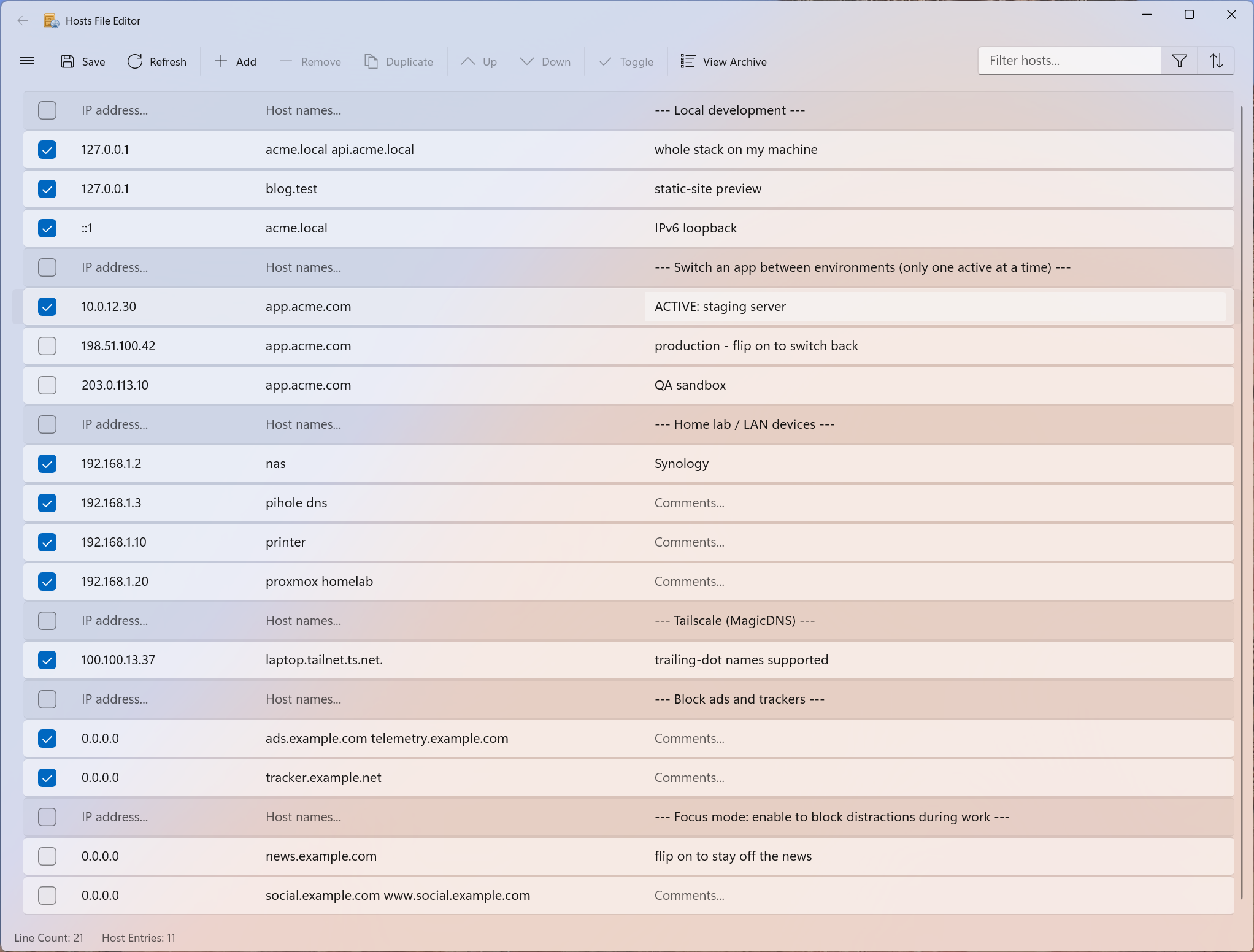
main modern editor (light)
Features
- Cut, copy, paste, duplicate, enable, disable and move one or more entries at a time
- Filter and sort when there are a large number of host entries
- Quickly enable and disable the entire hosts file
- Archive and restore various hosts file configurations (presets) when switching between environments
- Merge another hosts file into the current one, skipping duplicates
- Automatically ping endpoints to check availability, with a status-bar progress indicator
- Switch presets straight from the taskbar — right-click the app for a Jump List of your archives
- Full command line for scripting: switch presets, enable/disable, import/merge
- Global shortcut key (default
Ctrl+Shift+H) to hide/restore the classic edition from the tray - Modern variant supports light and dark themes
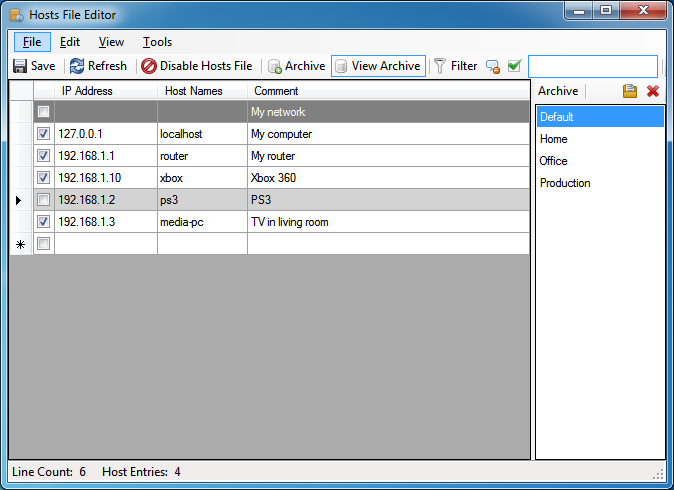
main classic editor with optional archive visible on right
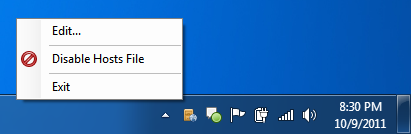
tray icon with context menu
Usage Notes
By default the classic edition closes to the tray. To exit completely you must select Exit from the File menu or tray context menu. Only one instance of the application is allowed at a time. If you try to open it again it will just activate the previously running instance.
When selecting rows to move, delete, copy, or cut be sure to select the entire row using the row header cell. If no entire rows are selected, cut, copy, paste, and delete apply individually to the selected cells.
Using the filter and sort while editing is quirky. The filter and sort are applied once a cell is edited so your cell may change positions or disappear depending on the current sort and filter.
Command line
Both editions include a headless command line (v1.5.0 classic / v1.2.0 modern) so scripts can switch presets and toggle the hosts file — for example, applying a preset before launching a program and restoring it afterward:
hfe -s MyHosts1
program.exe
hfe -s DefaultHosts
Commands
| Command | Effect |
|---|---|
apply <preset> (alias -s, switch) |
Switch the hosts file to a saved preset (archive) |
enable |
Enable the hosts file |
disable |
Disable the hosts file (renames it aside) |
import <file> |
Replace the hosts file with <file>, then save |
merge <file> |
Merge <file> into the hosts file, skipping duplicates, then save |
list |
List available presets |
help (--help, -h) |
Show usage |
Presets are the archives you save in the app (the Archive feature); apply matches the archive
name case-insensitively, with or without its file extension.
Exit codes: 0 success · 1 runtime error (preset or file not found, permission declined)
· 2 usage error (unknown or malformed command). Errors print a one-line message to stderr.
hfe.exe vs HostsFileEditor.exe
Two executables run the same commands:
hfe.exe— a small console launcher that ships next to the app. Use this in scripts: it is a console app, socmdand PowerShell wait for it to finish before running the next line, and its output pipes/redirects naturally. Store installs also registerhfeonPATH(an app-execution alias), sohfe -s MyHosts1works from any console.HostsFileEditor.exe— the app itself also accepts the same commands and runs them headless (no window). Because it is a windowed app,cmddoes not wait for it — wrap it asstart /wait "" HostsFileEditor.exe -s MyHosts1for sequential steps, or just usehfe.exe.
Run with no command and the app opens normally.
Both editions installed? The classic and modern Store apps each register the same
hfealias. Windows treats the duplicate as a conflict, so which edition ownshfeisn’t guaranteed — pick the one you want under Settings → Apps → Apps & features → App execution aliases (Windows 11: Advanced app settings → App execution aliases). Each Store package also keeps its own isolated app data, sohfe listreflects whichever edition the alias points at, which may differ from the other edition’s window. If you script withhfe, install just the edition you script against — or call that edition’shfe.exeby full path. Portable (zip) builds are unpackaged and don’t register the alias at all, so this is a Store-install-only concern (and only the classic edition ships a portable build).
Permissions
Commands that change the hosts file need administrator rights, exactly like saving in the GUI: run
from an elevated console for silent operation, or accept the single UAC prompt per command. A declined
prompt cancels cleanly with exit code 1. list and help never need elevation.
Note: the CLI runs independently of an open GUI window — if the editor is open with unsaved changes, a CLI change to the hosts file isn’t reflected there until you refresh (F5), and saving stale GUI edits afterward overwrites the CLI’s change (last writer wins).
Download
Runs on Windows 10 and 11, x64 or ARM64. Two editions are available — pick whichever you prefer; they share the same core and features.
Microsoft Store — recommended
Installs and updates automatically, with no separate download:
- Hosts File Editor (modern) — the new WinUI edition
- Hosts File Editor (classic) — the classic WinForms edition
Portable — v1.5.2
The classic edition rebuilt on .NET 10: fully self-contained (no runtime to install), runs as a standard user, and elevates on demand (a single UAC prompt) only when you save changes to the hosts file. Binaries are signed. Download directly from GitHub Releases:
What’s new in v1.5.2 (classic) / v1.2.2 (modern): a small quality patch. The modern edition no longer lets list rows bleed over the status bar on very large hosts files (100K+ entries) — a WinUI rendering bug that spilled the bottom rows past the list is now held off at the source, so the status bar stays clean at any list size. Both editions now show a clear “Invalid host names” validation message for a bad host name instead of a blank one. See the full release notes.
What’s new in v1.5.1 (classic) / v1.2.1 (modern): a quality & robustness patch following the v1.5.0 / v1.2.0 feature release. The command line no longer risks losing a saved (disabled) hosts configuration on a repeated disable, and reports ambiguous preset names instead of guessing. The classic edition now carries your settings forward across updates (window size, auto-ping, the global shortcut) instead of resetting them, keeps the tray icon and toggle in sync after a command-line change, and its taskbar Jump List survives Store updates. The modern edition fixes a rare crash when a background merge/import overlapped a ping, and a Jump List preset clicked during a reload now opens. Plus smaller polish: paste-while-sorted appends predictably, merges don’t ping discarded duplicates, and clearer messages. See the full release notes.
What’s new in v1.5.0 (classic) / v1.2.0 (modern): a feature release. A full command line in both editions plus a new hfe.exe console launcher — switch presets, enable/disable, import, and merge from scripts (Store installs put hfe on PATH). A taskbar Jump List: right-click the app icon to open any preset directly. File → Merge combines another hosts file into the current one, skipping duplicates (undoable). The modern edition gains Sort options next to the filter, and the IP column now sorts numerically in both editions (8.8.8.8 before 10.0.0.2 before 10.0.0.10, IPv6 after IPv4). Auto-ping shows a status-bar progress indicator while pings are in flight, flags per-entry failures (modern gets an error badge with tooltip), and pings immediately when enabled. The classic edition adds a global shortcut (default Ctrl+Shift+H, configurable) to hide/restore from the tray, its text filter is now case-insensitive to match modern, the parser validates IPs strictly at parse time, and the portable zip dropped ~9 MB of unused libraries. See the full release notes.
What’s new in v1.4.1: a small maintenance patch — the classic edition no longer targets the wrong entry when you Insert or Move right after a Move (the current-row anchor is restored by identity), and the modern edition skips a redundant filter pass on very large selections. See the full release notes.
What’s new in v1.4.0: a broad performance pass for very large hosts files — smaller installs (classic ~124 MB → ~53 MB), a ~3× faster parser, an async load behind a progress indicator, and responsive editing (cut / paste / duplicate / move / enable-disable / select-all / sort no longer freeze on ~400K-entry files) in both editions. Also: the classic column-header sort no longer crashes on .NET 10; the modern edition gains a status bar (line + host-entry counts), flicker-free columns, and keeps your selection across Check/Uncheck & Duplicate; and both editions parse trailing-dot FQDN hostnames (e.g. Tailscale MagicDNS host.tailnet.ts.net.). See the full release notes.
What’s new in v1.3.2: high-DPI polish and fixes — the classic edition is now PerMonitorV2 DPI-aware (crisp on 4K / scaled displays) with sharper toolbar icons; the taskbar icon renders unplated and the elevation prompt shows the app icon (both editions); the File menu sits above the toolbar again (classic); the modern edition gained the missing row keyboard shortcuts (Del, Ctrl+D, Alt+Arrow move, Ctrl+Alt+Arrow insert); and both editions now warn about unsaved changes on exit. See the full release notes.
What’s new since v1.2.0: a new modern edition (WinUI 3) on the Microsoft Store, native ARM64 builds, a move to .NET 10 with self-contained deployment, on-demand elevation (the app no longer runs entirely as administrator), per-user data under %LocalAppData%\HostsFileEditor, Authenticode-signed binaries, and many correctness fixes to undo/redo, move, cut/copy/paste, import/export, and filtering.
Legacy — v1.2.0
The last .NET Framework 4.x release that runs on Windows 7 and 8: much smaller because it relies on the .NET Framework already built into Windows rather than bundling a runtime, and proven over years of use. Kept here as the last known-good classic build:
Build
Requires .NET 10.0 or later. To build the installer you must have Windows SDK with makeappx.exe and signtool.exe commands.
To build the application, use the .NET CLI run from Visual Studio 2022 Developer PowerShell so makeappx.exe and signtool.exe are in your PATH:
# Build for Debug (includes debugging symbols)
dotnet build -c Debug

# Build for Release (optimized)
dotnet build -c Release

# Build and publish (creates deployable package)
dotnet publish -c Release

# Build and publish with binary logging (recommended for troubleshooting)
dotnet publish -c Release -bl:logs/publish.binlog

# Clean project build artifacts and logs directory
dotnet clean
The published apps are fully self-contained — the classic (WinForms) build bundles the .NET runtime and the modern (WinUI) build bundles both the .NET and Windows App SDK runtimes — so no separate runtime needs to be installed to run either one. Building and debugging the modern app from source still requires the Windows App SDK (installed with the Visual Studio “Windows application development” workload).
Building release artifacts (portable + Store)
Each dotnet publish above also packages the project it builds — the publish step signs the exe,
builds an MSIX with makeappx, and (for the classic edition) zips a portable build. To produce every
distributable in one shot — both editions for both architectures — use the build-all.ps1
script instead:
# Publish + package classic and modern, for win-x64 and win-arm64
.\build-all.ps1

# Same, but Authenticode-sign the exe and elevation helper (see docs/signing.md)
.\build-all.ps1 -Sign
It publishes all four flavor/architecture combinations and lays the output out under artifacts\:
- Portable zips —
artifacts\classic\<arch>\HostsFileEditor.zip. Only the classic (WinForms) edition produces a portable zip; these are what ship on GitHub Releases. - Store packages — the signed
.msixfor both editions, collected intoartifacts\store\with descriptive names (e.g.HostsFileEditor-modern-x64.msix) ready to upload to Partner Center.
Signing is off by default. The .msix package doesn’t need signing for the Store (Microsoft
re-signs it on ingestion), but signing the binaries — the app exe and the
HostsFileEditor.Elevate.exe helper — is recommended for both editions: the Store re-signs
the package, not the exe files inside it, so without -Sign the on-demand elevation prompt shows
“Unknown Publisher” instead of a verified publisher. Pass -Sign to Authenticode-sign the exe and helper
(Azure Trusted Signing); this also builds SmartScreen reputation for the self-distributed GitHub-release
zip. See docs/signing.md for setup.
To submit those Store packages without the Partner Center portal, publish-store.ps1 scripts the
submissions via StoreBroker, Microsoft’s PowerShell module
over the Store submission API. Run .\publish-store.ps1 -InstallTooling once to install the module,
then .\publish-store.ps1 -NoCommit after a signed build: for each edition it clones the current Store
submission, swaps in the new x64+arm64 packages and “What’s new” notes, and leaves a Draft to review in
Partner Center (drop -NoCommit to commit). See the Store release automation section in
CLAUDE.md for the one-time Azure AD / Partner Center setup.
Build Outputs
- Built files are automatically copied to the
.\bindirectory after publishing - Binary build logs can be generated using the
-blflag (e.g.,dotnet build -bl:logs/build-Release.binlog) - The build process automatically creates necessary directories (
bin,logs)
You can view binary logs using:
- Visual Studio: File → Open → build log file (.binlog)
- MSBuild Structured Log Viewer: Download from https://msbuildlog.com/
Contributing
Issues and pull requests are welcome — see the open issues to get started.
The project has recently migrated from WinForms to WinUI 3. Two UIs currently ship side by side on
top of one shared core library (HostsFileEditor.Core): the legacy classic (WinForms) UI and the new
modern (WinUI 3) UI. When changing behavior, prefer putting shared logic in the core so both editions
benefit; new UI work should target the WinUI project.
License
GNU General Public License v3.
Equin.ApplicationFramework.BindingListView is by Andrew Davey and license terms can be found at http://blw.sourceforge.net/.
Icons are from the Open Icon Library and their license and terms can be found at http://openiconlibrary.sourceforge.net/.
Privacy Policy · Made by Scott Lerch